[et_pb_section fullwidth=”on” specialty=”off” transparent_background=”off” allow_player_pause=”off” inner_shadow=”off” parallax=”off” parallax_method=”off” padding_mobile=”off” make_fullwidth=”off” use_custom_width=”off” width_unit=”on” make_equal=”off” use_custom_gutter=”off”][et_pb_fullwidth_header admin_label=”Services Header” title=”Services” background_layout=”dark” text_orientation=”center” header_fullscreen=”off” header_scroll_down=”off” parallax=”off” parallax_method=”off” content_orientation=”center” image_orientation=”center” custom_button_one=”off” button_one_letter_spacing=”0″ button_one_use_icon=”default” button_one_icon_placement=”right” button_one_on_hover=”on” button_one_letter_spacing_hover=”0″ custom_button_two=”off” button_two_letter_spacing=”0″ button_two_use_icon=”default” button_two_icon_placement=”right” button_two_on_hover=”on” button_two_letter_spacing_hover=”0″ background_color=”#a40800″ background_url=”https://www.1strand.com/site/wp-content/uploads/2015/07/red_web_72.jpg” title_font=”|on|||”]
[/et_pb_fullwidth_header][/et_pb_section][et_pb_section fullwidth=”off” specialty=”off”][et_pb_row][et_pb_column type=”1_2″][et_pb_image admin_label=”Image” src=”https://www.1strand.com/site/wp-content/uploads/2010/09/WebDevGraphic.jpg” show_in_lightbox=”off” url_new_window=”off” animation=”left” sticky=”off” align=”left” force_fullwidth=”off” always_center_on_mobile=”on” use_border_color=”off” border_color=”#ffffff” border_style=”solid”]
[/et_pb_image][/et_pb_column][et_pb_column type=”1_2″][et_pb_text admin_label=”Services Summary” background_layout=”light” text_orientation=”left” background_color=”rgba(255,255,255,0.75)” use_border_color=”off” border_color=”#ffffff” border_style=”solid” custom_padding=”20|20|20|20″]
Services Summary
- Domain registration and website hosting
- Basic WordPress template based semi-custom website design
- Mobile website optimization
- Enhanced search engine listings
- Social media network integration
- Advanced website customization with HTML5, CSS3, PHP, & Javascript
[/et_pb_text][/et_pb_column][/et_pb_row][/et_pb_section][et_pb_section fullwidth=”off” specialty=”off” transparent_background=”off” background_color=”#cccccc” allow_player_pause=”off” inner_shadow=”off” parallax=”off” parallax_method=”off” padding_mobile=”off” make_fullwidth=”off” use_custom_width=”off” width_unit=”on” make_equal=”off” use_custom_gutter=”off” module_id=”1st_hosting”][et_pb_row make_fullwidth=”off” use_custom_width=”off” width_unit=”on” use_custom_gutter=”on” gutter_width=”1″ padding_mobile=”off” allow_player_pause=”off” parallax=”off” parallax_method=”off” make_equal=”off”][et_pb_column type=”3_4″][et_pb_text admin_label=”Hosting Explanation” background_layout=”light” text_orientation=”left” use_border_color=”off” border_color=”#ffffff” border_style=”solid”]
Domain Registration and Hosting
[/et_pb_text][et_pb_toggle admin_label=”What is a Domain?” title=”What is a Domain?” open=”off” use_border_color=”off” border_color=”#ffffff” border_style=”solid” open_toggle_background_color=”#d8d8d8″ closed_toggle_background_color=”#cccccc” icon_color=”#a40800″]
So what is WordPress? WordPress started out as a blogging platform and has evolved into a full-fledged content management system (CMS). It is open-source software and has a huge community of users who are constantly improving and extending its capabilities.
[/et_pb_toggle][et_pb_toggle admin_label=”Can I Have An Email Address At My New Domain?” title=”Can I Have An Email Address At My New Domain?” open=”off” use_border_color=”off” border_color=”#ffffff” border_style=”solid” open_toggle_background_color=”#d8d8d8″ closed_toggle_background_color=”#cccccc” icon_color=”#a40800″]
You can add one or many email accounts to a purchased domain. Common email addresses include things like: employee_name@mydomain.com, info@mydomain.com, customer_service@mydomain.com, etc…
[/et_pb_toggle][et_pb_toggle admin_label=”What is Hosting?” title=”What is Hosting?” open=”off” use_border_color=”off” border_color=”#ffffff” border_style=”solid” open_toggle_background_color=”#d8d8d8″ closed_toggle_background_color=”#cccccc” icon_color=”#a40800″]
The collection of files which make up a website must be located on a computer server, along with the software necessary to serve these files over the internet. Companies which provide servers and the services needed to link them onto the internet, are called hosting providers. Typically, most small websites use shared hosting, in which a single server is shared among a number of websites. As the traffic to a website increases, a site can move up to dedicated hosting, in which a single server or a group of servers is used to host the website. 1strand uses several different hosting providers, currently including: Bluehost, GoDaddy, and HostGator.
[/et_pb_toggle][et_pb_toggle admin_label=”What Does 1strand Provide?” title=”What Does 1strand Provide?” open=”off” use_border_color=”off” border_color=”#ffffff” border_style=”solid” open_toggle_background_color=”#d8d8d8″ closed_toggle_background_color=”#cccccc” icon_color=”#a40800″]
- We will register the desired domain name(s) with a domain registrar
- We can create and administer email addresses under the desired domain
- We can provide hosting or manage a hosting account with a hosting provider
[/et_pb_toggle][/et_pb_column][et_pb_column type=”1_4″][et_pb_image admin_label=”Hosts Logo” src=”https://www.1strand.com/site/wp-content/uploads/2013/07/Hosts.png” show_in_lightbox=”off” url_new_window=”off” animation=”right” sticky=”off” align=”center” force_fullwidth=”off” always_center_on_mobile=”on” use_border_color=”off” border_color=”#ffffff” border_style=”solid” custom_margin=”|||40px”]
[/et_pb_image][/et_pb_column][/et_pb_row][/et_pb_section][et_pb_section fullwidth=”off” specialty=”off” transparent_background=”off” background_color=”#ffffff” allow_player_pause=”off” inner_shadow=”off” parallax=”off” parallax_method=”off” padding_mobile=”off” make_fullwidth=”off” use_custom_width=”off” width_unit=”on” make_equal=”off” use_custom_gutter=”off” module_id=”1st_wordpress”][et_pb_row make_fullwidth=”off” use_custom_width=”off” width_unit=”on” use_custom_gutter=”on” gutter_width=”1″ padding_mobile=”off” allow_player_pause=”off” parallax=”off” parallax_method=”off” make_equal=”off”][et_pb_column type=”1_4″][et_pb_image admin_label=”WordPress Logo” src=”https://www.1strand.com/site/wp-content/uploads/2013/07/WordPressClear.png” show_in_lightbox=”off” url_new_window=”off” animation=”left” sticky=”off” align=”center” force_fullwidth=”off” always_center_on_mobile=”on” use_border_color=”off” border_color=”#ffffff” border_style=”solid” custom_margin=”|40px||”]
[/et_pb_image][/et_pb_column][et_pb_column type=”3_4″][et_pb_text admin_label=”WordPress Explanation” background_layout=”light” text_orientation=”left” use_border_color=”off” border_color=”#ffffff” border_style=”solid”]
WordPress
[/et_pb_text][et_pb_toggle admin_label=”Why WordPress?” title=”Why WordPress?” open=”off” icon_color=”#a40800″ use_border_color=”off” border_color=”#ffffff” border_style=”solid”]
So what is WordPress? WordPress started out as a blogging platform and has evolved into a full-fledged content management system (CMS). It is open-source software and has a huge community of users who are constantly improving and extending its capabilities.
[/et_pb_toggle][et_pb_toggle admin_label=”Do I Really Want my Website Running on Open-Source Software?” title=”Do I Really Want my Website Running on Open-Source Software?” open=”off” icon_color=”#a40800″ use_border_color=”off” border_color=”#ffffff” border_style=”solid”]
Open-source software in general and WordPress in particular have a number of benefits.
- Constant testing and improvement
- Low cost of deployment
- Community of developers extending the capabilities of the software
- It is the most popular CMS worldwide
- An estimated 23% of websites in the world are run on WordPress!
- Large sites such as Time.com & TechCrunch.com rely on WordPress
[/et_pb_toggle][et_pb_toggle admin_label=”Will My Site Look Just Like Everyone Else’s?” title=”Will My Site Look Just Like Everyone Else’s?” open=”off” icon_color=”#a40800″ use_border_color=”off” border_color=”#ffffff” border_style=”solid”]
Customization of WordPress sites begins with themes. Themes enable the data contained in a website to be largely decoupled from the appearance with which the data is presented to the user. There are thousands, if not, tens of thousands of different themes available for WordPress. At 1st Strand, we primarily concentrate on using a small number of highly customizable themes. We have produced many websites which are based on the same underlying theme, but which vary greatly in appearance. When further customization is required, we use child themes which allow us to further modify the appearance and behavior of the website produced.
[/et_pb_toggle][et_pb_toggle admin_label=”Why Can’t I Just Use WordPress on My Own?” title=”Why Can’t I Just Use WordPress on My Own?” open=”off” icon_color=”#a40800″ use_border_color=”off” border_color=”#ffffff” border_style=”solid”]
YOU CAN!!! I produced my first commercial site for a friend using WordPress, learning as I went along. This took me about four months and required more time and produced more gray hairs than I care to remember. When I did my second site, I realized that I approached the first site in the wrong way. With each subsequent site, I’ve learned and expanded my range of capabilities. At this point, I believe that utilizing my knowledge and experience is well worth the money both for the end results and for the time that it will save you! That said, you absolutely can produce your own website with WordPress, but you probably haven’t read this far if that is what you want to do…
[/et_pb_toggle][et_pb_toggle admin_label=”What Does 1strand Provide?” title=”What Does 1strand Provide?” open=”off” icon_color=”#a40800″ use_border_color=”off” border_color=”#ffffff” border_style=”solid”]
- We will install and configure WordPress on the hosting provider
- We will install and configure the theme and plug-in files required for website operation
- We will design a website according to the customer’s specifications
- We can provide ongoing site maintenance and support changes and additions to the site
[/et_pb_toggle][/et_pb_column][/et_pb_row][/et_pb_section][et_pb_section fullwidth=”off” specialty=”off” transparent_background=”off” background_color=”#cccccc” allow_player_pause=”off” inner_shadow=”off” parallax=”off” parallax_method=”off” padding_mobile=”off” make_fullwidth=”off” use_custom_width=”off” width_unit=”on” make_equal=”off” use_custom_gutter=”off” module_id=”1st_mobile”][et_pb_row make_fullwidth=”off” use_custom_width=”off” width_unit=”on” use_custom_gutter=”on” gutter_width=”1″ padding_mobile=”off” allow_player_pause=”off” parallax=”off” parallax_method=”off” make_equal=”off”][et_pb_column type=”2_3″][et_pb_text admin_label=”Mobile Site Optimization” background_layout=”light” text_orientation=”left” use_border_color=”off” border_color=”#ffffff” border_style=”solid”]
Mobile Site Optimization
In the deep past, all websites were designed for desktop viewing and virtually unusable on mobile devices. This led to the need to create a special mobile version of the site which usually contained only a subset of features available on the full site. Many smaller websites today have not even yet made this addition as it requires a large investment to design and maintain an additional mobile site. The trend today is to use a scalable type of design known as responsive design which can rearrange its layout to fit a variety of displays such as horizontal & vertically oriented mobile phones & tablets as well as laptop and desktop computers. At 1strand we do all of our web designs using responsive themes, plug-ins and custom code, ensuring that your website looks terrific on any display. Try changing the width of your browser window right now if you are on a computer, or rotate the display if you are on a phone or tablet. The elements of this site will move and resize, and the style of the menus may change entirely. This is responsive design at work.
[/et_pb_text][/et_pb_column][et_pb_column type=”1_3″][et_pb_image admin_label=”Responsive Design” src=”https://www.1strand.com/site/wp-content/uploads/2013/07/Responsive.png” show_in_lightbox=”off” url_new_window=”off” animation=”right” sticky=”off” align=”center” force_fullwidth=”off” always_center_on_mobile=”on” use_border_color=”off” border_color=”#ffffff” border_style=”solid” custom_margin=”|||40px”]
[/et_pb_image][/et_pb_column][/et_pb_row][/et_pb_section][et_pb_section fullwidth=”off” specialty=”off” transparent_background=”off” background_color=”#ffffff” allow_player_pause=”off” inner_shadow=”off” parallax=”off” parallax_method=”off” padding_mobile=”off” make_fullwidth=”off” use_custom_width=”off” width_unit=”on” make_equal=”off” use_custom_gutter=”off” module_id=”1st_search”][et_pb_row make_fullwidth=”off” use_custom_width=”off” width_unit=”on” use_custom_gutter=”on” gutter_width=”1″ padding_mobile=”off” allow_player_pause=”off” parallax=”off” parallax_method=”off” make_equal=”off”][et_pb_column type=”1_4″][et_pb_image admin_label=”Search Logos” src=”https://www.1strand.com/site/wp-content/uploads/2015/08/Search_Logos.png” show_in_lightbox=”off” url_new_window=”off” animation=”left” sticky=”off” align=”center” force_fullwidth=”off” always_center_on_mobile=”on” use_border_color=”off” border_color=”#ffffff” border_style=”solid”] [/et_pb_image][/et_pb_column][et_pb_column type=”3_4″][et_pb_text admin_label=”Search Engine Listings” background_layout=”light” text_orientation=”left” use_border_color=”off” border_color=”#ffffff” border_style=”solid”]
Enhanced Search Engine Listings
It’s amazing to me how many businesses have not claimed their business with the major search engines. This business claiming is the first step in making sure your site gets noticed. Once a business has been claimed with the various search engines, its possible to create enhanced listings which are returned when someone performs searches relevant to your business. These listings can include logos, pictures, descriptions, maps, and business hours. 1strand can help you to claim your business and create these enhanced listings.
[/et_pb_text][et_pb_toggle admin_label=”Google” title=”Google” open=”off” icon_color=”#a40800″ use_border_color=”off” border_color=”#ffffff” border_style=”solid”]
This shows an example of an enhanced listing with Google which displays: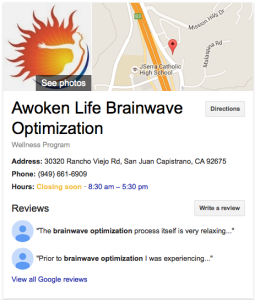
- Corporate logo
- Links to photos
- A location map
- Link to directions
- Address
- Phone number
- Hours
- Reviews
[/et_pb_toggle][et_pb_toggle admin_label=”Yahoo!” title=”Yahoo!” open=”off” icon_color=”#a40800″ use_border_color=”off” border_color=”#ffffff” border_style=”solid”]
This shows an example of an unenhanced listing with Yahoo! which only displays: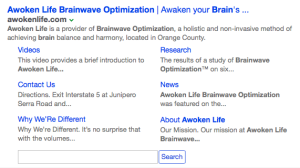
- Link to the website
- Content automatically generated from the top level of the website
[/et_pb_toggle][et_pb_toggle admin_label=”bing” title=”bing” open=”off” icon_color=”#a40800″ use_border_color=”off” border_color=”#ffffff” border_style=”solid”]
This shows an example of an enhanced listing with bing which displays: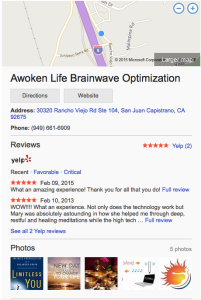
- A location map
- Link to directions
- Link to website
- Address
- Phone number
- yelp! Reviews
- Photos, including logo
[/et_pb_toggle][/et_pb_column][/et_pb_row][/et_pb_section][et_pb_section fullwidth=”off” specialty=”off” transparent_background=”off” background_color=”#cccccc” allow_player_pause=”off” inner_shadow=”off” parallax=”off” parallax_method=”off” custom_padding=”|” padding_mobile=”off” make_fullwidth=”off” use_custom_width=”off” width_unit=”on” make_equal=”off” use_custom_gutter=”off”][et_pb_row make_fullwidth=”off” use_custom_width=”off” width_unit=”on” use_custom_gutter=”on” custom_padding=”|” padding_mobile=”on” allow_player_pause=”off” parallax=”off” parallax_method=”off” make_equal=”off” gutter_width=”1″][et_pb_column type=”2_3″][et_pb_text admin_label=”Social Media Integration” background_layout=”light” text_orientation=”left” use_border_color=”off” border_color=”#ffffff” border_style=”solid” custom_padding=”||0|”]
Social Media Integration
[/et_pb_text][et_pb_toggle admin_label=”How Can My Company Use Social Media?” title=”How Can My Company Use Social Media?” open=”off” use_border_color=”off” border_color=”#ffffff” border_style=”solid” open_toggle_background_color=”#d8d8d8″ closed_toggle_background_color=”#cccccc” icon_color=”#a40800″]
In general, social media is a great way to both capture the attention of potential customers and to stay engaged with existing customers. Your company’s website can tie into your social media strategy through social media following, sharing, and integration.
[/et_pb_toggle][et_pb_toggle admin_label=”What is Social Media Following?” title=”What is Social Media Following?” open=”off” use_border_color=”off” border_color=”#ffffff” border_style=”solid” open_toggle_background_color=”#d8d8d8″ closed_toggle_background_color=”#cccccc” icon_color=”#a40800″]
Social media following makes it simple for website visitors to follow you on their favorite social networks, whether this is “liking” you on Facebook, following your tweets on twitter, or subscribing to your RSS feed. By clicking on the appropriate social media icon, they are then connected to your company in that network.
[/et_pb_toggle][et_pb_toggle admin_label=”What is Social Media Sharing?” title=”What is Social Media Sharing?” open=”off” use_border_color=”off” border_color=”#ffffff” border_style=”solid” open_toggle_background_color=”#d8d8d8″ closed_toggle_background_color=”#cccccc” icon_color=”#a40800″]
Social media sharing makes it easy for visitors to your website to share your content on their social media networks. In this manner, you are exposed to their network of friends, followers, and subscribers. Social sharing buttons can be added anywhere within your website.
[/et_pb_toggle][et_pb_toggle admin_label=”What is Social Media Integration?” title=”What is Social Media Integration?” open=”off” use_border_color=”off” border_color=”#ffffff” border_style=”solid” open_toggle_background_color=”#d8d8d8″ closed_toggle_background_color=”#cccccc” icon_color=”#a40800″]
Social media integration more tightly couples your social media postings to your website. Examples of this would include having your most recent tweets or Facebook posts appear somewhere on your website such as in a sidebar or in your footer.
[/et_pb_toggle][/et_pb_column][et_pb_column type=”1_3″][et_pb_image admin_label=”Social Media Icons” src=”https://www.1strand.com/site/wp-content/uploads/2015/08/SocialMediaIcons2.png” show_in_lightbox=”off” url_new_window=”off” animation=”right” sticky=”off” align=”right” max_width=”300″ force_fullwidth=”off” always_center_on_mobile=”on” use_border_color=”off” border_color=”#ffffff” border_style=”solid”] [/et_pb_image][/et_pb_column][/et_pb_row][/et_pb_section][et_pb_section fullwidth=”off” specialty=”off” transparent_background=”off” background_color=”#ffffff” allow_player_pause=”off” inner_shadow=”off” parallax=”off” parallax_method=”off” padding_mobile=”off” make_fullwidth=”off” use_custom_width=”off” width_unit=”on” make_equal=”off” use_custom_gutter=”off” module_id=”1st_code”][et_pb_row make_fullwidth=”off” use_custom_width=”off” width_unit=”on” use_custom_gutter=”off” gutter_width=”1″ padding_mobile=”off” allow_player_pause=”off” parallax=”off” parallax_method=”off” make_equal=”off”][et_pb_column type=”1_3″][et_pb_image admin_label=”Code Image” src=”https://www.1strand.com/site/wp-content/uploads/2015/08/Code.jpg” show_in_lightbox=”off” url_new_window=”off” animation=”left” sticky=”off” align=”center” force_fullwidth=”off” always_center_on_mobile=”on” use_border_color=”off” border_color=”#ffffff” border_style=”solid” custom_margin=”|||40px”]
[/et_pb_image][/et_pb_column][et_pb_column type=”2_3″][et_pb_text admin_label=”Advanced Customization” background_layout=”light” text_orientation=”left” use_border_color=”off” border_color=”#ffffff” border_style=”solid”]
Advanced Customization
In order to take full control over the design of your website, it is necessary to dig down to the underlying code. 1strand can provide code-level customization of a website, if desired. This is accomplished primarily through the following four languages.
[/et_pb_text][et_pb_tabs admin_label=”Coding Tabs” use_border_color=”off” border_color=”#ffffff” border_style=”solid”] [et_pb_tab title=”HTML5″ tab_font_select=”default” body_font_select=”default”]
Hypertext Markup Language version 5 (HTML5) is the language that web pages are constructed in. Modifying HTML gives the web designer complete control over the data contained in a web page.
[/et_pb_tab][et_pb_tab title=”CSS3″ tab_font_select=”default” body_font_select=”default”]
Cascading Style Sheets version 3 (CSS3) is the method that is used to control the style of web pages. Modifying CSS gives the web designer the ability to present the data contained in a web page in an infinite variety of styles.
[/et_pb_tab][et_pb_tab title=”PHP” tab_font_select=”default” body_font_select=”default”]
PHP is a scripting language that is used to build web pages on the web server before they are delivered to the end user. PHP is used by WordPress to take template files and use these to build the final HTML web pages. By writing code in PHP, the designer can make template files behave in whatever manner is required.
[/et_pb_tab][et_pb_tab title=”JavaScript” tab_font_select=”default” body_font_select=”default”]
JavaScript is a dynamic programming language that runs on the client’s computer. It allows interaction between the user and the web page, can control the browser, and can dynamically alter the web content that is displayed.
[/et_pb_tab] [/et_pb_tabs][/et_pb_column][/et_pb_row][/et_pb_section]